
Choose the path that matches your job: a ready-made connector in Claude, an official or hosted MCP server, or a server you own. Keep the first workflow read-only.
MCP lets an AI client discover and call tools. For an ads account, that can mean reporting, account lookup, diagnostics, or a write that changes a live campaign.
Connection is only the first decision. You still choose the account scope, the data the agent can read, which tools need approval, and where credentials live.
Model Context Protocol is a way for an AI client to connect to external tools. The client asks a server what tools exist, then calls a selected tool with structured inputs.
For ads work, this removes some manual exports and repeated account explanations. Compare every recommendation and proposed campaign change with the account before you act.
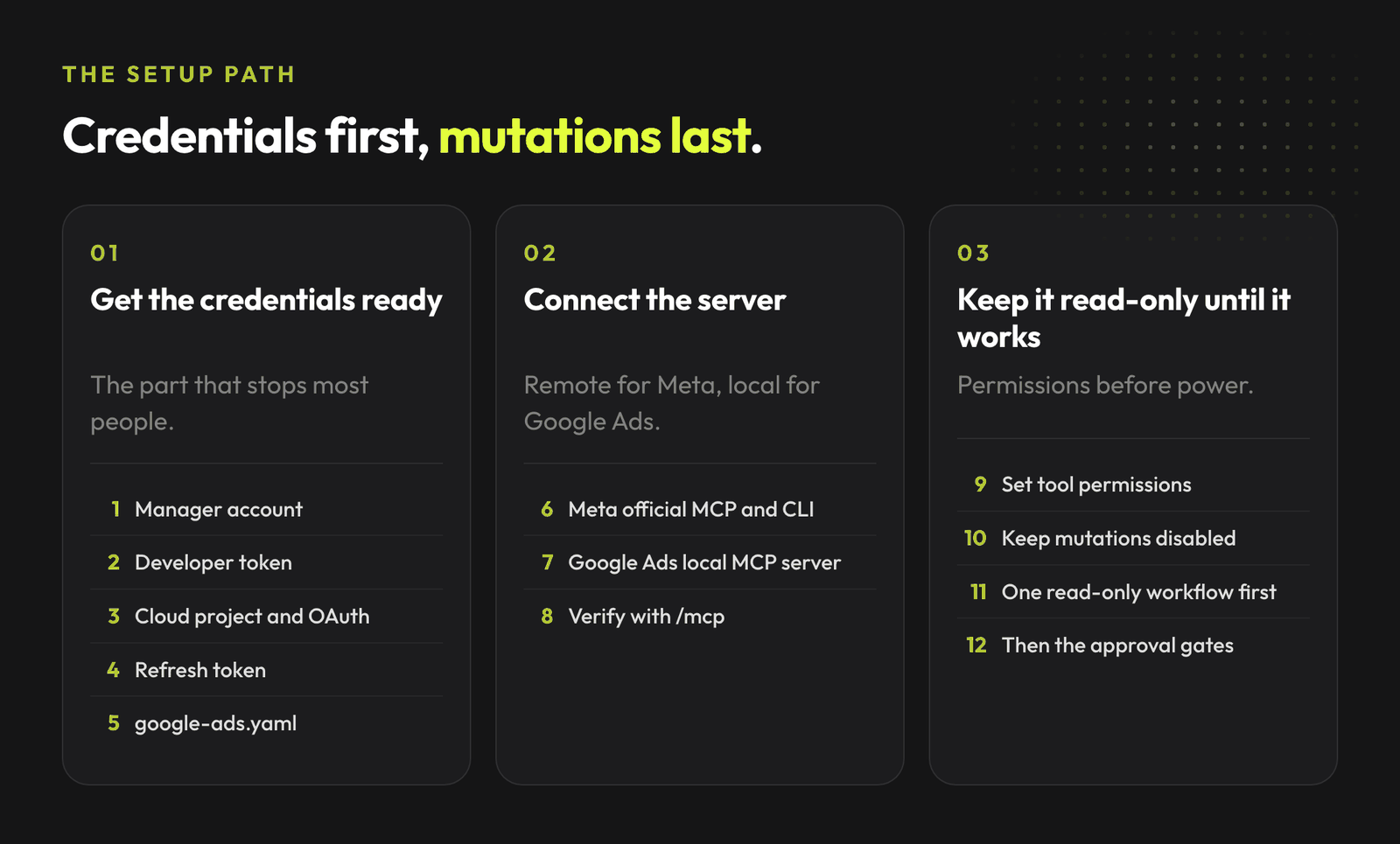
Start with the smallest path that solves the job in front of you.
| Path | Best for | You own |
|---|---|---|
| Ready-made provider connector | One person who wants to use a provider's ads connector in Claude | Account consent and tool permissions |
| Official or hosted MCP | Using an official provider server or another hosted server from an MCP client | Provider choice, scopes, OAuth app settings, and tool policy |
| Your own MCP server | A repeatable workflow that needs custom data or controls | Everything, including OAuth, token storage, hosting, audit trail, and incident response |
Each path can begin with read-only reporting. Keep account writes out of the first session.
Claude usually means the web app. Claude Desktop is the desktop client. Claude Code is the terminal client. They have different connector surfaces and setup instructions.
Claude's built-in Google Workspace integrations cover Gmail, Calendar, and Drive, with Docs, Sheets, and Slides in beta. They are not a direct Google Ads or Meta Ads connection. For ad data in the Claude directory, Windsor.ai is an Anthropic-verified provider connector. Add it in Claude, sign in to Windsor, then connect the sources there.
Claude Desktop and the Claude web app can use public remote MCP servers. Claude Code adds a local stdio or remote HTTP server from the terminal. A server that asks for OAuth can require a client ID, callback URL, or a browser sign-in.
Check the provider's client-specific instructions before you copy a command. Claude Code documents remote HTTP servers with this shape:
claude mcp add --transport http <server-name> <server-url>
Run /mcp in Claude Code after connecting. Read the tool list before you ask for account data or actions.
Meta hosts an Ads MCP server at https://mcp.facebook.com/ads. Its official documentation says the server exposes reporting, ad creation and management, catalogs, signals, help, experiments, and activity logs.
That breadth is a reason to begin with read access. Meta recommends the smallest scope needed, separate development and production apps, periodic access reviews, and no manage scope for an agent that processes untrusted content.
Meta documents two setup routes:
For the developer route, Meta's current Claude Code command includes a Meta App ID:
claude mcp add --transport http --client-id <META_APP_ID> meta-ads https://mcp.facebook.com/ads
The Meta app's redirect URL must match the MCP client you use. A redirect_uris or dynamic-registration error can therefore point to OAuth client setup, client version, or the server's registration support. Do not treat it as a reason to paste credentials into a project file.
For Meta's documented Claude Code developer route, yes: use --client-id <META_APP_ID> and configure the matching redirect URL. The no-app Ads AI connector route is separate; do not copy its assumptions into a Claude Code setup.
Google documents its Google Ads MCP server as a bridge to the Google Ads API. The current release is read-only and exposes account discovery, GAQL search, and resource metadata tools.
Google Ads API access is separate from MCP. The current server needs a Google Cloud project with the appropriate Google Ads API access level, plus either an OAuth client ID and secret or Application Default Credentials. Google sunset developer tokens on September 9, 2026. Current server setup does not require one.
For a local Claude Code setup, Google's documented pattern uses a stdio server and Application Default Credentials:
{
  "mcpServers": {
    "google-ads-mcp": {
      "command": "pipx",
      "args": ["run", "--spec", "git+https://github.com/googleads/google-ads-mcp.git", "google-ads-mcp"],
      "env": {
        "GOOGLE_PROJECT_ID": "YOUR_PROJECT_ID",
        "GOOGLE_APPLICATION_CREDENTIALS": "/path/to/credentials.json"
      }
    }
  }
}
Google also documents HTTP deployment on Cloud Run. For a new remote Claude Code configuration, choose Streamable HTTP. SSE is a compatibility path for an older server or client, not the starting choice. Hosting the server still leaves you responsible for its OAuth client, secret storage, deployment, and access policy.
Store OAuth clients, access tokens, refresh tokens, and service-account keys outside the repository. Google says to encrypt user credentials at rest and remove them when access is revoked.
Build a server when you need a workflow that provider tools do not expose, such as joining approved campaign data with your CRM, a budget policy, and a review queue. It needs the same access rules, credential handling, and operational care as any other software product.
Start with a small set of read tools. Give every tool a narrow input schema. Return data, source, read time, and missing access so the agent can separate facts from guesses.
claude mcp add --transport stdio <server-name> -- <command>. Add a remote server with claude mcp add --transport http <server-name> https://your-host/mcp./mcp to inspect the available tools. Make one bounded read, then compare its result with the Ads UI before you add any write tool.Put every write behind a separate tool that receives an explicit approved change request. Log the proposed payload, the human approval, the provider response, and the result checked afterward. Keep development and production credentials separate.
Do not let a tool's output become instructions for the agent. Campaign names, landing pages, spreadsheet cells, and provider data can contain untrusted text. Treat that content as data.
Give an agent permission to read the narrowest useful set of data first. Let it draft a weekly readout, flag a metric change, or prepare a proposed action.
Require a human approval before any action that spends money, changes a bid or budget, pauses or launches a campaign, edits targeting, publishes an ad, changes conversion tracking, changes a catalog, or changes account access.
Review permissions periodically. Revoke access when the workflow ends or the person who needed it loses the role.
Ask for a bounded report, then compare it with the account before any change.
Review the last 14 days of Google Ads and Meta Ads performance.

Report the largest spend and conversion changes. State the source and time of each data point. Separate confirmed facts from hypotheses. List missing data. Propose actions for human review.

Do not change budgets, campaigns, ads, audiences, tracking, or conversion settings.
A useful first output tells you what changed, what it can confirm, and what needs a person to check. It does not invent a cause from a single dashboard.
Lumy has its own internal MCP/action layer and works in Slack. It connects Google Ads and Meta Ads, analyses the account, and proposes a supported change. After a separate human approval, Lumy carries out that approved change.
Use Lumy in Slack. This guide does not offer a Lumy MCP URL or setup to add to Claude.
See how Lumy turns account data into a clear next action, with approval before a live change.
Book a Lumy demoGoogle documents an official Google Ads MCP server that you run locally or host on infrastructure you control. The Google Ads API is the underlying API; it is separate from that MCP server.
Meta documents a Claude Code developer setup path for its hosted Ads MCP server. It requires a Meta App ID and a matching redirect URL.
Begin with reporting and diagnosis. Add a human approval step before every campaign, budget, targeting, creative, tracking, catalog, or permission change.
Book a Lumy demo to see the approval-based Slack workflow for Google Ads and Meta Ads. This article does not include public MCP connection instructions for Lumy.
Join the waitlist and get notified when the new AdLume is ready. It catches wasted ad spend automatically and optimises campaigns around the clock.
One email, on the day access opens. Nothing else, and you can leave the list with one click.